Showing posts with label Android tricks. Show all posts

BYPASS ANDROID PATTERN LOCK WITHOUT LOSING HIS DATA (PC TRICK)

Trick To Bypass Android Pattern Lock:- Hellow Our lovely Readers :D Welcome To Officialtrick. Today i found an another Official trick to bypass android pattern lock without losing the data. Now with the help of this trick you will never loss your private data. Soo lets Start the trick :D


Requirements
  • Android SDK Tools For PC :– Click Here To Download 
  • Android phone with USB Debugging enabled. 
  • Data Cable. 

Must Read:- Top 12 Penetration Testing Apps In Android You Should Know
How To Set Up Your PC? 
  • Visit the page from the above link to download Android SDK tool for your PC. 
  • Now select “Other Download Option“

  • Then download the first one. 
  • Now install and open the application. 
  • Then Select “Android SDK Platform Tools” and click on Install. 
  • Now your PC is ready to deal with the problem. 

Setting Up Your Phone: 
Your phone must have “USB Debugging” enabled. 

How To Enable USB Debugging On Your Android Device? 

  • Go to the Settings of the Phone. 
  • Then About Phone. 
  • Tap On Build Number 7 Times. 
  • Now a pop up will appear “You Have Now Become A Developer”. 
  • Then again go to settings. 
  • Scroll down. 
  • There you will see “Developer Option”. 
  • Open it and check “USB Debugging”.
Must See:- How To Control Your TV Using Your Android & iOS Device

How To Bypass Android Pattern Lock?
  • Connect your android device to PC/Laptop. 
  • Now open the folder where you installed “Android SDK Tool“. 
  • Generally it is available here :– Users>>App Data>>Local>>Android>>Android SDK>>Platform Tools Enable “Show Hidden Files And Folder” as the folder is hidden. 
  • Now right click on “Platform Tools” Folder and select “Open Command Window Here“.


  • Or you can simply type “CMD” in the address bar and press Enter. 
  • First check your device is correctly connected or not by using this command “ADB devices“. 
  • Now enter this command. 
  • Now enter this command: 

adb shell cd /data/data/com.android.providers.settings/databases 
sqlite3 settings.db 
update system set value=0 where name=’lock_pattern_autolock’; 
update system set value=0 where name=’lockscreen.lockedoutpermanently’; 
.quit 
  • If the command is not working then use this
  • adb shell rm /data/system/gesture.key 
  • Now you are done. 
  • Reboot your phone and you will see that your pattern lock is removed. 
  • Comment for any query. 

Must See:- How To Access Your Computer Hard Drive From Android


Final Words: 
This trick is working and fully tested. This for educational purpose only. This will not harm your phone but if anything happens we will not be responsible. Please do not use this trick for a false and bad activity as we will be not responsible for this if anything happens. Share this and help us to grow. This “How To Bypass Android Pattern Lock Without Losing The Data” trick is fully working and tested. How To Bypass Android Pattern Lock question is now answered. 

SHARING IS S3XY (Y) :D

Top 12 Penetration Testing Apps In Android You Should Know


Penetration Testing Apps
Welcome Back Our Lovely Readers. :D Soo Today We are going to show you 10 best Android penetration testing apps. Have a brief look on the listed apps below.
For all the testers or developer who are using android for them, we are here with Best Android Penetration Testing Apps. Penetration means penetrate any security system and this is mainly used to check the vulnerability of the bug in the network security. And mainly these testing is done with some security pro tools.
But today there are many  android hacking apps developed that can be used as the pentesting tool. These tools will be really helpful and can be used by a limited knowledge about security and its vulnerability. So have a look at these tools below

Top 10 Best Android Penetration Testing Apps

So here we have Penetration Testing apps that are meant for hacking, hackers, security researchers. Use these apps according to your knowledge.

Pentesting Apps For Android:

#1 Fing


Fing

This is a professional App for network analysis. A simple and intuitive interface helps you evaluate security levels, detect intruders and resolve network issues. It helps you to find out which devices are connected to your Wi-Fi network, in just a few seconds.

 Features Of Fing: 

  • Checks the availability of Internet connection
  • Works also with hosts outside your local network
  • Tracks when a device has gone online or offline
  • Launch Apps for specific ports, such as Browser, SSH, FTP
  • Displays NetBIOS names and properties
  • Displays Bonjour info and properties
  • Supports identification by IP address for bridged networks
  • Sort by IP, MAC, Names, Vendor, State, Last Change.
  • Free of charge, no banner Ads
  • Available for iPhone, iPad and iPod Touch with retina and standard displays.

#2 Hackode


Hackode

Hackode : The hacker’s Toolbox is an application for penetration tester, Ethical hackers, IT administrator and Cyber security professional to perform different tasks like reconnaissance, scanning performing exploits etc.

Features Of Hackode Is It Contains Tools Like:

  • Reconnaissance
  • Google Hacking
  • Google Dorks
  • Whois
  • Scanning
  • Ping
  • Traceroute
  • DNS lookup

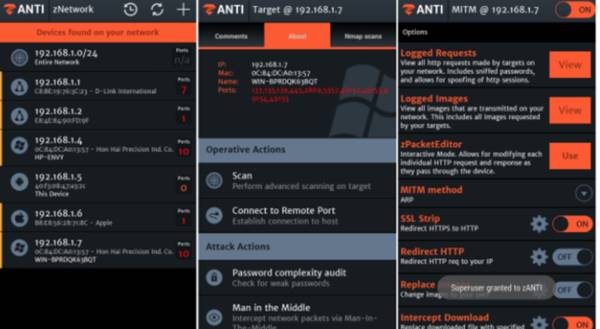
#3 zANTI


zANTI

zANTI is a comprehensive network diagnostics toolkit that enables complex audits and penetration tests at the push of a button. It provides cloud-based reporting that walks you through simple guidelines to ensure network safety.

Features Of zANTI 

  • Uncover authentication, backdoor, and brute-force attacks, DNS and protocol-specific attacks and rogue access points using a comprehensive range of fully customizable network reconnaissance scans.
  • Enable Security Officers to easily evaluate an organization’s network and automatically diagnose vulnerabilities within mobile devices or websites using a host of penetration tests
  • Highlight security gaps in your existing network and mobile defenses and report the results with advanced cloud-based reporting through zConsole

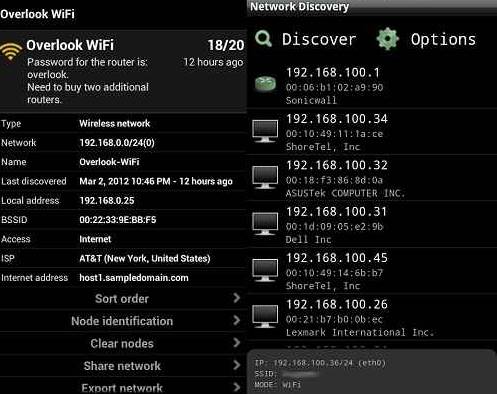
#4 Network Discovery


Network Discovery

This is quite simple and cool apps that don’t require root access to perform its functioning. So you can use this cool app in your android to keep the record of all the network details on which your android is currently connected.

#5 FaceNiff 2.4 final- Session Hijacker for Android


FaceNiff 2.4 final- Session Hijacker for Android

Your Facebook account is at risk, just like a Firesheep (for firefox hacking) there is a FaceNiff for hijacking the session of famous social networking websites includes facebook and twitter. FaceNiff is developed by Bartosz Ponurkiewicz who created Firesheep before but faceniff is for android OS.

Features of FaceNiff

  • Sniff and intercept web session profiles over the WiFi
  • Possible to hijack sessions only when WiFi is not using EAP
  • FaceNiff works on WPA2

#6  WPScan


WPScan

This is a cool one and really great penetration testing tool. As this app is basically designed for testing the vulnerability of WordPress. And with this, you can find the vulnerability of the site being running on WordPress.

#7 WPS Connect


WPS-Connect

The another good app and one of my favorite app that can be used to test the Wifi network flaws and using this app you can actually break into a security of wifi and can easily access that wifi by cracking the key from this excellent app that runs on rooted android.

Features Of WPS Connect

  • With this app, you’ll connect to WiFi networks which have WPS protocol enabled
  • WPS Connect is focused on verifying if your router is vulnerable to a default PIN.
  • WPS Connect lets you check if your router is vulnerable or not and act accordingly.

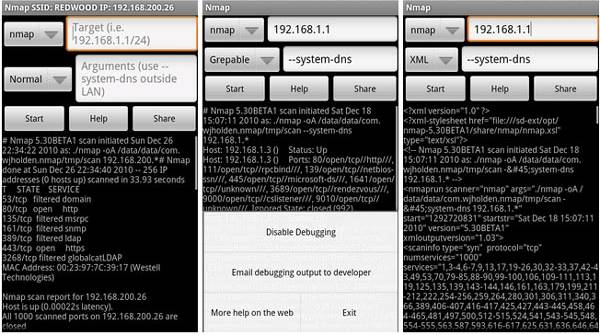
#8 Nmap for Android


Nmap for Android

Nmap (network mapper) is one the best among different network scanner (port finder) tool, Nmap mainly developed for Unix OS but now it is available on Windows and Android as well. Nmap for android is a network mapping app for your phone! Once your scan finishes you can e-mail the results. This application is not an official app but it looks good.

Features Of Nmap

  • Nmap works on both rooted and nonrooted phones
  • It helps you to discover hosts, protocols, open ports, services and its configuration and vulnerabilities on networks.
  • Nmap binaries are transferred using HTTPS by default.
  • Frontend supports all known Android architectures: arm, MIPS and x86.

#9 Penetrate Pro


penetrate pro

This is cool wifi penetration testing android app. The main working of this app is for testing WAP/WEP keys for wireless routers to that your android being connected. This app is also considered as harmful by some antiviruses but it doesn’t harm your device.

Features Of Penetrate Pro:

  • Routers based on Thomson: Thomson, Infinitum, BBox, Dmax, Orange, SpeedTouch,
  • BigPond, O2Wireless, Otenet.
  • DLink
  • Eircom
  • Pirelli Discus
  • Verizon FiOS (only some routers)
  • Fastweb (Pirelli & Telsey)
  • Jazztel_XXXX and WLAN_XXXX

#10 Network Spoofer


Network Spoofer

This app is one of the best security testing tools for your android. And this can be used in order to change websites on other people’s computers from your Android-based smartphones. Although this is not exactly a penetration testing tool, it can still show you how easy or difficult it is to hack a particular network with your android.

Features Of Network Spoofer

  • Lets you change websites on other people’s computers from an Android phone.
  • Connect’s to wifi quickly, you can use the spoof option to make full use of this app.
  • Make websites experience gravity
  • Redirect websites to other pages
  • Delete random words from websites
  • Wobble all pictures / graphics around a bit

#11 IP Tools: Network Utilities


10+ Best Android Penetration Testing Apps

IP Tools is a powerful network utility suite for analyzing and adjusting networks. It allows quick detecting any computer network problems and boosting network performance. This is a must-have app for IT specialists and network administrators. The app combines the most popular network utilities usually found in Windows or Linux. They will help you fix a network problem easily or optimize the network when you are hundreds kilometers away

Features Of IP- Tools: 

  • Ping
  • LAN scanner
  • DNS lookup
  • Port scanner
  • Whois – provides information about a website and its owner
  • Router setup directly from your smartphone
  • Traceroute
  • Connection log
  • IP Calculator
  • IP & Host Converter

#12 Packet Capture


10+ Best Android Penetration Testing Apps

Packet capture/Network traffic sniffer app with SSL decryption. Not that feature rich yet, but it’s a powerful debugging tool especially when developing an app. It Capture network packets and record them.

Features of Packet Capture: 

  • Capture network packets and record them.
  • SSL decryption using man-in-the-middle technique.
  • No root required.
  • Easy to use.
  • Show packet in either hex or text.

Conclusion

So above are 10 Best Android Penetration Testing Apps. Download and install these pentesting app in your android to test the attacks on different networks. Hope you like our work, share it with others too. Leave a comment if you need our team help at any of the issue.
SHARING IS S3XY :D ;)
Answer Any Call WIthOut ToucHIng Your AndroId DevIce Screen !

Answer Any Call WIthOut ToucHIng Your AndroId DevIce Screen !


HEY FRIENDS OFFICIAL TRICK IS COME WITH A AWESOME TRICK WHICH YOU LIKE...


STEPS:

» FrIends FIrst DowNload AIrCall Accept Free App From Here and Install It


» Run the app and switch on the functionality

» Now your app is ready, thus whenever you will get a call all you need is to wave your hand over the proximity sensor area nd your phone should pick up the gesture.

Now EnJoy ....


Note:-


>You can Answer Calls by putting your hand or ear close

>You can Reject call also

>You can automate the speaker phone

>Can send SMS after rejecting call

TRICK TO CHARGE YOUR ANDROID SMARTPHONE FASTER THEN EVER

How To Charge Your Android Battery Faster
Hellow OFFICIALTRICK Visitors. :D Today we are here with some best & simple ways to charge your android smartphone faster, Just Read our full post carefully. I hope It will help u to Charge Your battery faster.
For android users, we are here with Best Ways To Charge Your Android Battery Faster. Today more than billions are using an android device and everyone knows about the battery life of android device which reduces very quickly and takes a lengthy time to recharge , just because of lots of apps running in the background. Normally android takes up to 2 hours to charge. But the charging time can be minimized by some simple tweaks. So have a look at the ways below.

How To Charge Your Android Battery Faster

The ways I am going to tell you are really very powerful and there is no need to install any third party app, Just some simple tweaks that will let you charge your android battery quickly.

#1 Use Airplane Mode While Charging


How To Charge Your Android Battery Faster
In Airplane mode, all your networks get stopped and that is always the best mode to charge your android. As at that time your battery consumption will go very down and you can easily charge it with great efficiency. Even this tweak can reduce your charging time to up to 40% so must try this.

#2 Turn off Your Phone If Possible for faster Charging


How To Charge Your Android Battery Faster
This mode is most effective when you need emergency battery charged in a very short time. In this mode you, battery consumption goes to zero and it gets charged quickly as compare to the ON android with lots of running apps

#3 Turn Off Mobile Data, Wifi, GPS, and Bluetooth


How To Charge Your Android Battery Faster
While charging you should Turn Off Mobile Data, Wifi, GPS and Bluetooth in your android as they consume lots of battery and your battery charging process will be longer with all these on. So better is to turn them off and enjoy the fast charging.

#4 Use Original Charger Adapter & Data Cable


How To Charge Your Android Battery Faster
Only the products that are specially designed for your android from the manufacture are the best compatible with your android. So better is to use the original charger for quick battery charging.

#5 Never use your phone while in Charging


How To Charge Your Android Battery Faster
Many rumors are there which shows that using a phone while charging make smartphones to explode, but it is yet to be proven. But one thing is for sure that using your smartphone while charging will increase your overall charging time. So we suggest you to never use smartphone while charging

#6 Never charge your phone from PC or Laptop


How To Charge Your Android Battery Faster
The reason behind this was very simple whenever you used to charge your phone from PC it will not do any benefit to your phone because computer USB ports are typically 5V @ 0.5 amp. Since the USB provides half the current, it charges the phone at half the speed.

#7 Use Clean Master


How To Charge Your Android Battery Faster
Clean Master is the World’s Most Trusted Android Optimizer, Speed Booster, Battery Saver and Free Anti-Virus app, Clean Master Helps Accelerate and Clean Up Over 600 Million Phones! It Also Provides Real-time Protection With the #1 Antivirus Engine, and Secures Your Private Data With the AppLock Function. The key benefit of using this app was you will get an option to install the extension named Boost charge, which really helps to reduce overall charging time. Moreover, It is all in one app that you must have for overall performance.

#8 Start Using Fast Charging Android app


How To Charge Your Android Battery Faster
Fast Charging is an ultimate tool, which can boost your battery charging speed by 20-40%. This app will automatically activate when you connect your charger and it will boost your charging speed. When you connect your charger, Fast Charging will detect it and limit the power consumption of your phone/tablet. Then your battery doesn’t withdraw much power during the charging time and, therefore, it can charge very quickly.
So above is all about Best Ways To Charge Your Android Battery Faster. With the guidance of all these tips discussed above you can easily charge up your android device within 30-50% reduced charging time. Hope you like our work, do share these tips with others too. Leave a comment below if you have any related queries with this.
ANY PROBLEM ? FEEL FREE TO COMMENT HERE :D

ALWAYS REMEMBER :D SHARING IS S3XY :D :V